2022.01.25
当前项目的目录结构如下,
.
├── build
│   └── index.js
├── src
│   ├── index.js
│   └── utils
│       └── math.js
└── webpack.config.js 下面我们将通过两种模块引入方式来对文件进行打包,项目地址在此。
An absolute path is defined as the specifying the location of a file or directory from the root directory(/).
那么我们在 js 模块中 import 文件的时候,使用绝对路径 的方式的话,就是这样的,import { min } from "/Users/cary/workspace/github/Frontend/webpack-alias/src/utils/math.js",
// utils - math.js
export const min = 1;
// src - index.js
import { min } from "/Users/cary/workspace/github/Frontend/webpack-alias/src/utils/math.js";
console.log("min", min);
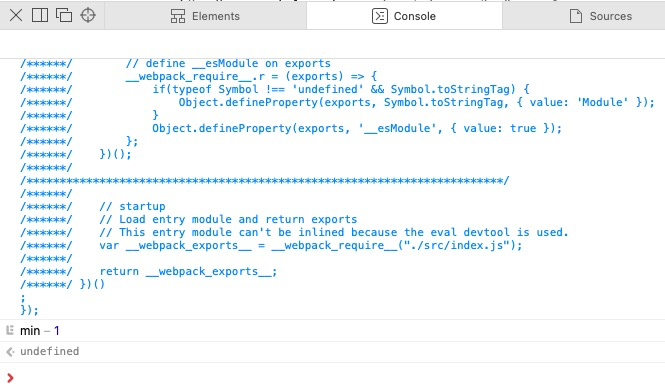
然后我们跑下 webpack 命令,将打包好的 js 文件里的内容复制到浏览器的 console 里去,你可以看到打包成功了,
这个和绝对路径的差别也很明显,绝对路径是以计算机系统根目录为基准,而相对路径是以当前目录为基准。
一般在项目里进行模块引用的时候使用的都是相对路径,绝对路径太长了。使用相对路径的话,我们不需要知道绝对路径长什么样,就可以对模块进行引用,对比下两种引入方式,
// src - index.js
import { min } from "./utils/math.js";
console.log("min", min);
跑下 webpack 命令也是可以成功的。
但是实际使用中,我们如果我们要引用的文件和我们的项目根目录很近,和我们的当前目录很远,那么我们需要使用 N 多个 ../ 才能引用到那个模块,要是我们能相对于项目根目录使用相对路径就好了。
Webpack 就有那么个属性 alias,可以做到这点。来看下我们的 webpack 的配置,可以看到 resolve 里配了个 alias 对象,我们将 @ 符号 映射到了 src 文件夹上,为什么会使用 @ 符号我们下面会讲,
const path = require("path");

module.exports = {
  mode: "development",
  entry: {
    index: "./src/index.js",
  },
  output: {
    path: `${__dirname}/build`,
    filename: "[name].js",
    libraryTarget: "umd",
    library: "test",
  },
  resolve: {
    alias: {
      "@": path.resolve(__dirname, "src/"),
    },
  },
};
这样的话,我们就可以通过下面这种方式进行模块引用了,
import { min } from "@/utils/math.js";
console.log("min", min);
打包下,也是正常的
asset index.js 4.64 KiB [emitted] (name: index)
runtime modules 670 bytes 3 modules
cacheable modules 224 bytes
  ./src/index.js 203 bytes [built] [code generated]
  ./src/utils/math.js 21 bytes [built] [code generated]
webpack 5.40.0 compiled successfully in 92 ms
那么为什么在 alias 里使用 @ 来映射目录呢?
可以防止和其他 js 模块冲突。比如,如果我们在 alias 里加了个 "eslint": path.resolve(__dirname, "src/"),这样的话,我们在其他 js 中引用 src 文件夹下面的 index 文件的话,我们可以这样写,import * from 'eslint/index.js',如果我们项目里有一个包叫 eslint 的,那么不就冲突了吗,谁知道你引用的 eslint 模块呢,还是指代我们的 src 目录。
为了防止冲突,我们给 npm 包命名 的时候还可以给 npm 包加一个 namespace,比如,@alibaba/test,这样就不用担心和 npm 上的其他叫 test 的包冲突了,具体的可以看下这里,
而单独一个 @ 是无效的,它不会匹配上任何的 npm 包,所以你可以放心使用 @ 来做目录的映射,取其他名字都可能有一定几率会重复,这个就完全 OK。

一般在 VSCode 里开发的话,项目里还会配一个 jsconfig.json 或者 tsconfig.json 文件,它所在的位置可以用来标志当前目录是项目的根目录,以此来给 VSCode 提供项目上下文,这样 VSCode 里提供的一些 JavaScript language service 可以充分利用这个文件来提升我们的开发体验,具体可以看下这里。